Skip to content
TVReviews

Buying guide

Soundbar buying guide: channels, Dolby Atmos, eARC and when to add a sub or rears

How to read soundbar specs, decide how many speakers you need and connect the bar to your TV correctly.

By TV Reviews Editors 3 min read
A slim glowing bar under a dark rectangle with sound waves spreading across a room.
In this article
  1. The three styles
  2. Reading channel numbers
  3. Dolby Atmos
  4. Connecting: eARC and HDMI
  5. When to add a sub or rears
  6. A buying path

Key takeaways

  • Soundbars come in three styles: a single bar, a bar with a subwoofer, and a bar with a subwoofer and rear speakers.
  • Channel numbers such as 5.1.2 count speaker groups: the first number is main channels, the second is subwoofers and the third is height channels.
  • Dolby Atmos adds height and object-based sound, and a soundbar delivers it with upward-firing speakers or processing.
  • Connect over HDMI eARC for the best compatibility, and check whether the bar has HDMI inputs and 4K 120Hz passthrough.

TV speakers have little room to do their job in a thin cabinet, which is why a soundbar is one of the easiest upgrades. The difficulty is the jargon. Here is how to read the specs and pick the right size of system.

The three styles

TechRadar splits soundbars into three groups:

  1. A single all-in-one bar. Easiest to place and set up.
  2. A bar with a subwoofer. Adds bass presence for movies, games and music.
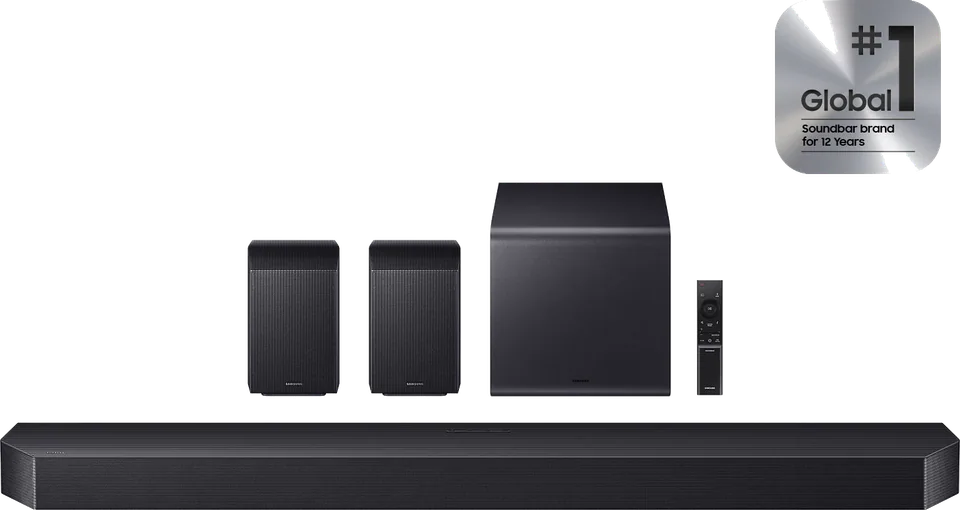
  3. A bar with a subwoofer and rear speakers. Delivers real surround effects from behind you.

Reading channel numbers

Soundbar specs use a notation like 5.1.2. The first number counts main channels (front left, center, right and any surrounds), the second counts subwoofers, and the third counts height channels that produce overhead sound.

Examples from the sources:

  • 3.1: TechRadar describes Sony's HT-S2000 as a 3.1-channel design with virtual surround. It adds that this will not beat a bar with height channels.
  • 9.1.4: The Sonos Arc Ultra, which What Hi-Fi? names the best Dolby Atmos soundbar overall, uses a 9.1.4 configuration, and What Hi-Fi? says it replaced a 5.0.2 design on the first Arc. See the Sonos Arc Ultra.
  • 11.1.4: TechRadar's premium setup uses a Samsung multi-box system with two rear speakers and a subwoofer that totals 11.1.4 channels. Samsung's related HW-Q990H, which What Hi-Fi? lists as its best package, is in our database.

More channels do not automatically mean better sound, but they do mean more directional detail if your room is set up for it.

Dolby Atmos

Dolby presents Atmos as a mixing approach where filmmakers position individual sounds in space. On a soundbar, that translates into height and movement. The Sonos Beam Gen 2 does it without upward-firing speakers. What Hi-Fi? explains that two of its five front-facing arrays handle overhead and surround sounds, using processing to create the sense of height. The reviewer notes genuine overhead sound is a stretch for a small bar but that its virtual Atmos beats similarly priced rivals.

Atmos works best with Atmos content. Many streaming services offer some, but not every show.

Connecting: eARC and HDMI

The simplest connection is one HDMI cable from the TV's eARC port to the soundbar's eARC output. HDMI.org says eARC supports high-bitrate audio including Dolby TrueHD, DTS:X and Dolby Atmos. Sonos describes setup for the Arc Ultra as a simple HDMI eARC connection, controllable from your TV remote. For more detail, read eARC vs. ARC.

Also check:

  • HDMI inputs and passthrough. TechRadar flags that Sonos's Beam Ultra has no HDMI pass-through, a drawback if several consoles compete for ports, and that Sony's HT-S2000 cannot pass a 4K 120Hz signal, which is awkward for current console owners. If you plan to connect devices to the bar, count the inputs.
  • Sound format support. Some bars lack DTS support. What Hi-Fi? lists missing DTS support as a drawback for both the Arc Ultra and the Beam Gen 2, so check this if your sources use DTS.
  • Wi-Fi and streaming. Wi-Fi support is common for music streaming and multi-room options.

When to add a sub or rears

A subwoofer matters if you watch action movies, play games or listen to bass-heavy music, or if your bar is a compact one. TechRadar says the compact dual-driver subwoofers on Samsung's systems produce serious, controlled bass. Rear speakers matter if you want sounds to move behind the seating area. TechRadar says the rear speakers in Samsung's top system are excellent for surround effects. What Hi-Fi? notes the Arc Ultra can grow into a system with Sonos Era speakers and a sub, and TechRadar notes the Beam can be expanded with a subwoofer and rears.

If you mostly watch dialogue-driven TV and news, a simple bar is enough.

A buying path

  1. Decide on the room and budget. Small rooms suit compact bars; larger rooms benefit from a sub and rears.
  2. Choose the style. Single bar, bar plus sub, or full system.
  3. Check the connections. Make sure the TV has an eARC port, and see whether you need HDMI inputs on the bar.
  4. Check format support. Atmos, and DTS if your sources use it.
  5. Compare in the builder. The tool helps pair a bar with a TV.

Other options in our database include the LG S95AR and the Bose Smart Ultra Soundbar. See also home theater on a budget.

Heads up Soundbar sound depends on room shape and placement. If you mount the TV on a wall, place the bar below it or on a shelf according to the manufacturer's instructions, and hire a professional if mounting a heavy TV is beyond your comfort.
  • soundbar
  • dolby-atmos
  • earc
  • subwoofer

Good to know

Questions people ask

Do I need a subwoofer?

A separate subwoofer adds low-frequency punch and is part of the second and third soundbar styles TechRadar describes. A single-bar design is simpler and more compact, but a sub helps with movies and bass-heavy content.

Do I need rear speakers?

Rear speakers add real surround effects instead of virtual ones. TechRadar found the rears on a Samsung system excellent for surround effects. They are a step up that costs more and takes more room.

Is Dolby Atmos worth it on a soundbar?

What Hi-Fi?'s TV editor calls Atmos soundbars the simplest, neatest way to get immersive cinema sound at home, provided you choose the right model. It matters most for movies and shows mixed in Atmos.

Mentioned in this article

The products

Sonos Sonos Arc Ultra

Sonos · 2024

Arc Ultra

Soundbar

From

$1,099

Sonos Sonos Beam (Gen 2)

Sonos · 2021

Beam (Gen 2)

Soundbar

From

$499

Samsung Samsung HW-Q990H

Samsung · 2026

HW-Q990H

Soundbar

From

$1,500

LG LG S95AR

LG · 2025

S95AR

Soundbar

From

$1,200

Sources and further reading

6 sources used for this article. We paraphrase and link, we do not republish.

  1. The best soundbars for all budgets · TechRadar
  2. Best Dolby Atmos soundbars · What Hi-Fi?
  3. Dolby Atmos - Official Site · Dolby
  4. HDMI ARC - What is eARC? Audio Return Channel · HDMI Licensing Administrator
  5. As TechRadar's TV tester, I've created 4 TV and soundbar setups to suit every budget · TechRadar
  6. Sonos Reveals Arc Ultra, its New Soundbar Featuring Sound Motion · Sonos

More buying guide

Keep reading

Get the next one in your inbox

A short letter when something is worth your attention. Unsubscribe any time.